Simulator Workshop
The What-If Simulator: Modeling Your Path to Financial Escape Velocity
Passive budgeting tracks where your money went; active financial modeling shows where your future is headed. LEVEL’s What-If Simulator shifts you away from stagnant spreadsheets and lets you dynamically stress-test your debt paydown velocity in real-time.
Many individuals attempting to clear their debts fall into a state of financial burnout. They pay their minimums monthly, yet see their total liability numbers move at a crawl. The lack of visual acceleration creates severe decision fatigue. LEVEL’s What-If Simulator resolves this by giving you a live feedback loop to calculate exactly how extra monthly payments compress your timeline and maximize interest savings.
Key Features of the Simulator
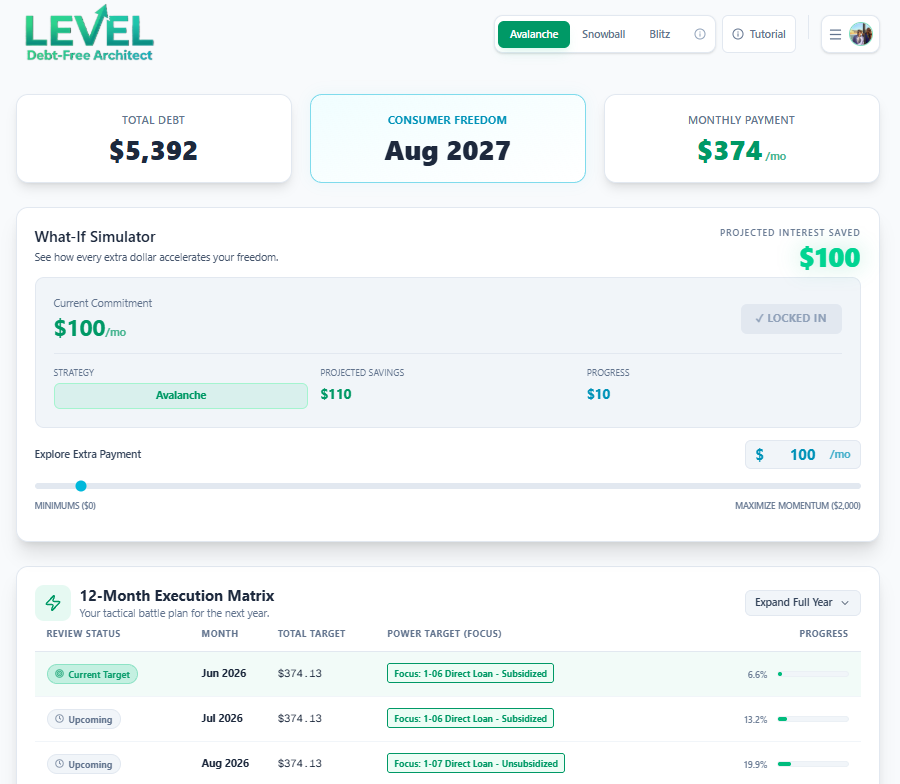
The simulator acts as the primary cockpit for your debt payoff routing engine. By adjusting the parameters, you reprogram your entire financial blueprint instantly:
Interactive Principal Velocity Slider
Adjust your baseline commitment using the interactive slider. By increasing your extra monthly contribution, you instantly see the principal curve steepen and the overall timeline compress.
Real-Time Interest Savings Metrics
The simulator calculates the total lifetime interest you will pay under current parameters. It compares this against a baseline “minimum-only” payoff to display your net interest savings in actual dollars.
Algorithmic Strategy Toggle
Swap between Snowball, Avalanche, and the proprietary Blitz method with a single click. The simulator re-routes your payments instantly, demonstrating which algorithm saves the most money for your unique loan profile.
Practical Use Cases for Stress-Testing
The true power of the What-If Simulator lies in its ability to validate financial decisions before you commit actual dollars. Here are three primary modeling scenarios:
Scenario A
The Subscription Audit
Model the impact of cutting $75 in monthly subscription waste. Inputting that $75 directly into the simulator shows how much total time it shaves off your final loan, demonstrating the compounding value of small changes.
Scenario B
The Career Raise Split
Receive a raise? Instead of letting lifestyle inflation consume it, allocate 50% of the net increase to your slider. The simulator visualizes your new accelerated payoff curve alongside your interest-savings tally.
By running these stress tests, you build confidence. You are no longer guessing whether a budget adjustment is “worth it”—the exact timeline shifts and cash savings are explicitly graphed on your dashboard.
Best Practices for Simulator Calibrations
To maximize the mathematical efficiency of the simulator, structure your planning around these three guidelines:
- Establish a Bulletproof Baseline: Ensure your loan balances and APRs are exactly correct before running simulations. Inaccurate baseline data leads to flawed payoff schedules.
- Model “Aggressive vs. Sustainable” Targets: Do not just set the slider to its maximum. Run a secondary simulation at a moderate, sustainable monthly payment to create a safety margin for unexpected expenses.
- Execute monthly re-calibrations: As your balances drop and interest behaviors shift, come back to the simulator. Tweak the slider to match your current real-world cash availability.
Frequently Asked Questions
How does the What-If Simulator calculate interest savings?
Can I simulate a one-time lump sum payment (windfall)?
Is the What-If Simulator available on the free tier?
Simulate Your Freedom
Don’t guess your payoff date. Calculate it.
Take control of your amortization schedule. Access the LEVEL What-If Simulator today ↗