Payoff Customization
The Custom Strategy: Designing a Flexible, Personalized Payoff Sequence
Standard financial math tells you to target rates (Avalanche) or balances (Snowball). But what about your real life? LEVEL’s Custom strategy bypasses algorithmic rigidity and gives you total flexibility to sequence your debt payoff order according to your personal values.
Rigid budgeting plans cause financial burnout because they ignore emotional variables. You might have a co-signed auto loan you want to clear to protect a family member, or a zero-interest introductory balance that requires aggressive clearing before rates spike. Forcing these liabilities into default templates creates unnecessary decision fatigue. Custom sequencing hands control of your velocity payments directly back to you.
Custom Strategy Walkthrough
The screenshare below demonstrates the complete cycle of setting up your Custom blueprint: establishing your loan stack, sequencing your priorities, using the What-If Simulator slider, and auditing your calculations through the visualization dashboard.
Step-by-Step Setup & Calibration
To replicate the workflow shown in the walkthrough, follow these steps:
Load Your Debt Accounts
Populate your liabilities in the Setup Wizard. For example, add a Credit Card ($8,000 balance at 22.9% APR), an Auto Loan ($15,000 balance at 4.5% APR), and a Student Loan ($25,000 balance at 6.8% APR).
Choose ‘Custom’ Payoff Route
In the Strategy step, choose **Custom**. This unlocks the sequence selector panel on your main dashboard, letting you bypass default Avalanche or Snowball sorts.
Determine Your Sequence Order
On the dashboard sequence list, click the loans in your exact preferred order. In the walkthrough, we choose the **Car Loan** first (ranking 1), the **Chase Sapphire Credit Card** second (ranking 2), and the **Student Loan** third (ranking 3).
Stress-Test with What-If Slider
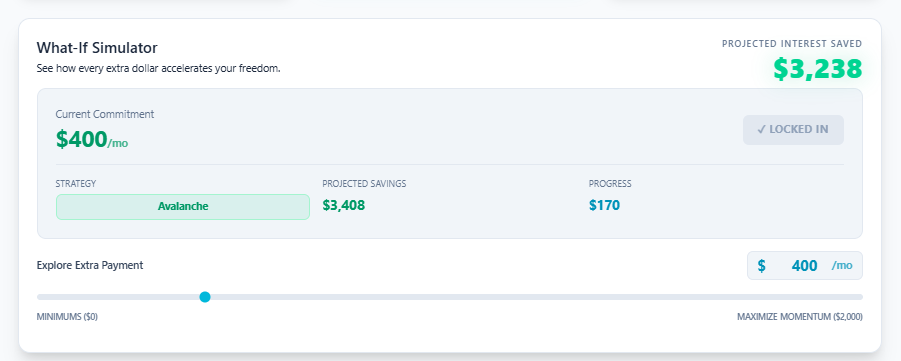
Use the slider to set a sustainable extra monthly contribution. Keeping it between **$200 and $1,000** ensures your targets remain realistic. The simulator dynamically recalculates your payoff dates as you slide. Settle at a comfortable point (such as $600) and click **Lock In Strategy**.
Audit Your Visual Metrics
Scroll down to the visualizer container. Cycle through the views: 1) **Loan Breakdown Stack** (hover over the graph to inspect individual loan values over time), 2) **Monthly Payment Efficiency** (interest vs. principal velocity), and 3) **Monthly Payment Breakdown**.
Why Flexibiliy Wins Over Rigid Templates
Many financial tools treat you like a mathematical equation, ignoring the emotional weight of debt. For example, clearing a loan co-signed by a parent or spouse releases immediate relationship stress, which is often worth more than saving a few dollars in interest. Custom sequencing respects your personal narrative.
Rigid Templates
Snowball / Avalanche
Sort loans strictly by rates or sizes. This rigid sorting order often ignores emotional liabilities, zero-interest promotional end-dates, or family financial obligations.
LEVEL Hybrid
Custom Sequencing
Combines the mathematical tracking of the What-If Simulator with manual order overrides. This allows you to protect relationship capital or address expiring intro APRs first.
Best Practices for Custom Sequencing
- Map Out Expiring Promo Rates: Place cards with temporary 0% interest rates at the top of your custom sequence to wipe them out before interest penalties compile.
- Balance Relationships with Math: Prioritize private or co-signed debts if they affect relationships, but keep high-rate credit cards near the top of the stack to avoid excessive interest bleed.
- Model Before You Lock: Swap to Avalanche or Snowball temporarily inside the What-If Simulator to see the difference in total interest paid. This shows you the exact cost of choosing a custom sequence.
Frequently Asked Questions
Does Custom sequencing increase the total interest I will pay?
Can I re-sequence my loans midway through my payoff plan?
Is the Custom strategy available under the free Starter tier?
Design Your Order
Don’t let rigid algorithms dictate your personal budget.
Stop fighting automated templates. Build your custom payoff blueprint on LEVEL today ↗