
Software Architecture / Payoff Simulators
The Best Debt Payoff Calculator with Extra Payments
When you commit an extra $200, $500, or a lump-sum tax refund toward your debt, where should that money actually go? Basic web calculators assume static minimums. A modern extra payment calculator dynamically routes every surplus dollar to crush your highest daily interest leakage.
If you are searching for the best debt payoff calculator with extra payments, you have likely encountered the limitations of traditional tools. Most free online calculators only model a single loan at a time. Excel templates break whenever an unexpected payment occurs (as explored in why you should ditch the debt payoff spreadsheet). And complex budgeting apps like YNAB (see why debt architecture beats zero-based budgeting) require linking your sensitive bank credentials just to see an estimated payoff date.
To eliminate high-interest liabilities efficiently, you need a dynamic, what-if payment simulator that visualizes how extra capital compresses your timeline—with 100% privacy and zero bank logins.
Why Static Calculators Fail When Modeling Extra Payments
Traditional payoff tools follow static rules. If you select the Snowball method, the calculator dumps all extra capital into your smallest balance, ignoring whether a massive credit card is actively bleeding $15/day in compounding interest (see how to calculate your daily interest bleed). If you select pure Avalanche, it locks all extra capital into one large balance for two years, causing decision fatigue.
Real-world repayment requires an interactive What-If Simulator that lets you model both recurring monthly surplus and one-time cash injections across multiple strategic algorithms.
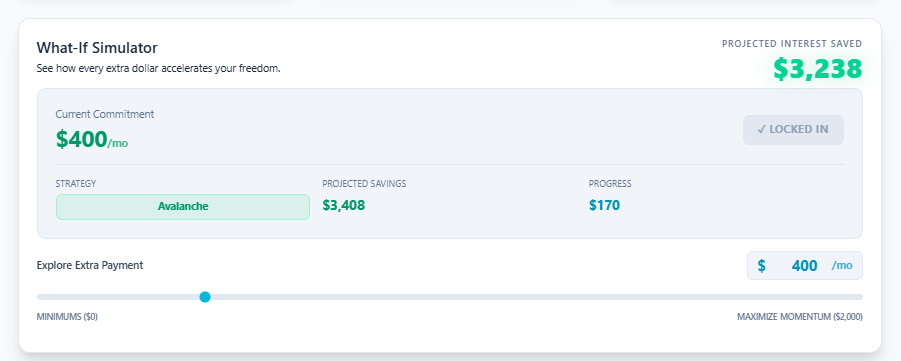
Figure 1: The LEVEL What-If Simulator dynamically recalibrating debt-free timelines with extra monthly payments.
Comparison: How Top Debt Payoff Calculators Stack Up
Here is how the leading payoff tools and calculators compare when managing complex, multi-loan portfolios with extra payment allocations:
| Tool / Calculator | Extra Payment Modeling | Payoff Strategy Options | Bank Sync Required? | 12-Month Visual Blueprint |
|---|---|---|---|---|
| LEVEL Debt-Free Architect | Dynamic Real-Time Simulator | Blitz, Avalanche, Snowball, Custom | Zero (100% Private) | Yes (Interactive Bricks) |
| Undebt.it | Standard Cascading Surplus | Snowball, Avalanche, Custom | Optional Plaid Sync | Table / Text List |
| Vertex42 Excel Templates | Manual Column Additions | Snowball, Avalanche | None (Local Sheet) | Static Charts |
| YNAB (You Need A Budget) | Category Allocation Only | Zero-Based Budgeting | Mandatory Bank Sync | No (Expense Focused) |

Figure 2: Comparing multi-strategy output to ensure your extra payment dollars achieve maximum mathematical efficiency.
4 Essential Features to Look for in an Extra Payment Calculator
Feature 01
Dynamic Interest Bleed Recalculation
As extra payments reduce your balances, your daily interest accrual shifts. The calculator must dynamically re-route future extra dollars to the next highest dollar drain (the Blitz Protocol).
Feature 02
Lump-Sum vs. Recurring Simulation
You should be able to toggle between ongoing monthly extra cash flow ($150/mo) and isolated one-time windfalls ($2,000 tax refund) to see exact date acceleration.
Feature 03
100% Privacy & Zero Bank Sync
You should never have to surrender your banking passwords, Plaid credentials, or transaction data just to calculate a mathematical payoff roadmap.
Feature 04
Visual 12-Month Milestone Construction
Numbers on a spreadsheet don’t motivate. An interactive 12-month blueprint with visual progress bricks turns daunting debt into clear, sequential milestones.
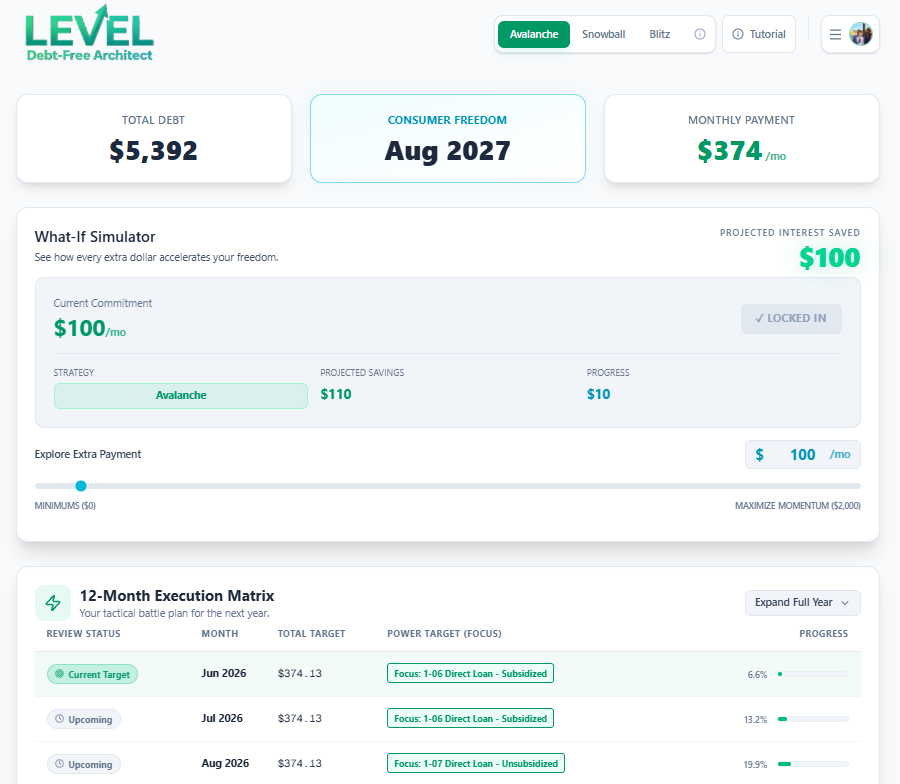
Figure 3: Interactive 12-month blueprint mapping exact extra payment milestones to zero debt.
How to Maximize Your Extra Payments in 3 Steps
To extract the highest return on investment from every surplus dollar you allocate (as detailed in how to update your debts monthly and when to apply dynamic strategies):
1. Audit Your Current Daily Dollar Bleed
Enter your balances and APRs into the simulator. Identify which card is draining the most actual cash per 24-hour cycle.
2. Test Your “What-If” Extra Payment Scenarios
Use the slider to see how adding $100, $250, or $500 shaves months and thousands in interest off your debt-free date.
3. Lock in Your 12-Month Execution Blueprint
Export your interactive construction roadmap. Review and update your numbers once a month in under 5 minutes.
Frequently Asked Questions
How do extra payments affect my credit card interest?
Should I make extra payments as a lump sum or monthly?
Is LEVEL Debt-Free Architect free to use?
Interactive What-If Extra Payment Simulator
Stop guessing how fast extra payments get you to zero.
Test your custom payoff timeline today with LEVEL Debt-Free Architect. Run side-by-side strategy comparisons, simulate extra payments in real time, and map your visual 12-month construction blueprint—100% private, with zero bank sync required.