Live Roadmap Guide
The Roadmap to Freedom: How to Update Your Debts Every Month
Maintaining a financial plan shouldn’t feel like a chore. LEVEL’s Roadmap to Freedom translates abstract balance sheets into a gamified, visual blueprint of bricks. By tracking your monthly payments here, you see your financial rebuild take solid shape in real-time.
Standard personal finance tracking tools fall short because they focus exclusively on what you spent in the past. This historical perspective causes financial burnout as you feel trapped in a loop of passive logging. Shifting to an active build framework removes decision fatigue. Below is the step-by-step process for executing your monthly roadmap calibrations.
Step-by-Step Monthly Workflow
Keeping your schedule aligned takes less than five minutes each month. Follow these sequential steps to maintain your velocity:
Review Your Current Monthly Brick
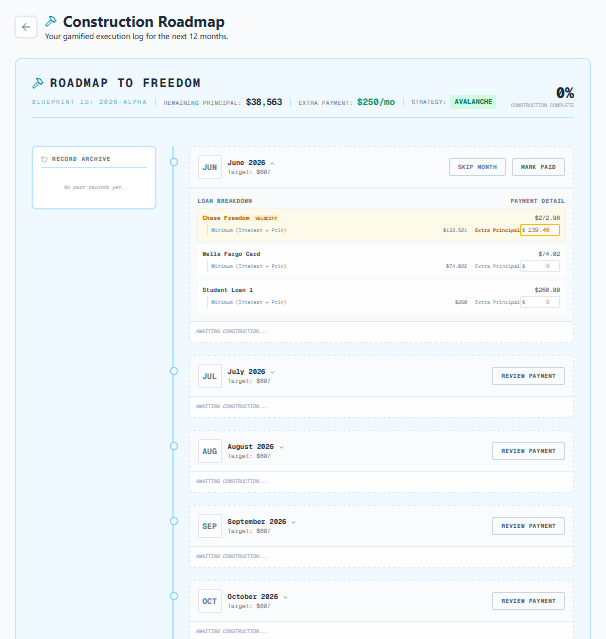
At the start of the billing cycle, open your Roadmap view. The active brick displays your target payment allocations—including minimums and extra payments mapped by your selected strategy.
Execute Payments with Lenders
Log in to your respective banking portals and submit the payments outlined by your LEVEL blueprint. Ensure the values match the simulated targets to preserve amortization accuracy.
Mark Paid and Build the Brick
Return to your LEVEL dashboard. Click **Review Payment** on the month’s active card, verify the amounts paid, and click **Mark Paid**. The screen will render the concrete-pouring animation, locking the brick as **Built**.
Handling Variations: Reinforced Bricks & Overpayments
Your financial situation changes. The Roadmap is designed to dynamically adapt when you pay more or less than your target:
Overpayment Scenario
Reinforced Bricks
If you make an extra payment above your simulated target, enter the additional amount when marking the brick paid. The system will wrap the brick in a golden steel frame, denoting it as Reinforced, and recalculate future dates.
Underpayment Scenario
Timeline Recalibration
If an unexpected expense prevents you from meeting your target, enter the actual amount paid. LEVEL’s engine will automatically adjust future months’ bricks to keep your schedule aligned.
This dynamic adjustment prevents the discouragement common with static plans. Instead of starting over from scratch after an underpayment, LEVEL’s routing logic—including the cash-saving Blitz strategy—recalculates to ensure you stay on the fastest possible path to freedom.
Advanced Features to Watch
The roadmap contains several specialized indicators to help you plan ahead:
- Weather Warnings: Look ahead on your schedule for seasonal budget alerts. The system warns you of historically expensive months (like December holidays) so you can adjust your savings targets.
- Milestone Markers: Visual flags celebrate key achievements, such as dropping below a total balance threshold or completely wiping out a single loan card.
- PDF Roadmap Export: Print your visual blueprint by downloading the clean PDF overview directly from your settings. Keep it visible to maintain your daily focus.
Frequently Asked Questions
What happens if I miss updating a month on my Roadmap?
What makes a brick “Reinforced”?
Does LEVEL connect directly to my bank accounts to update automatically?
Build Your Tomorrow
Pour the concrete on another debt-free milestone.
Stop watching your balances compound. Mark your active monthly brick built on LEVEL today ↗